 gen3-poke-multiplayer
For real
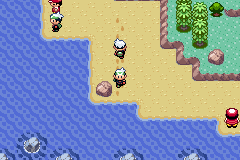
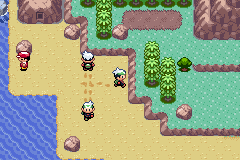
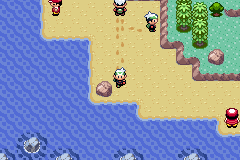
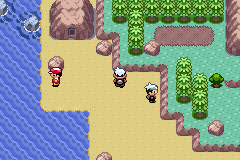
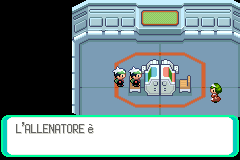
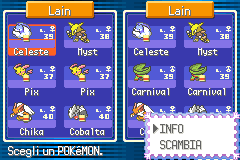
Screenshots taken during testing: every extra character is another player, connected from somewhere else.
How to try it
Three ways, and all three end up in the same game. Agree on a room number (1–65535, any number: it's your «table») and everybody uses it. Note: English (USA/Europe) and Italian Emerald both work and play together. Both are tested on a real GBA too.
⚠️ Use at your own risk. The program never writes your save file, but it runs code inside the game on your original cartridge and comes with no warranty. If you can, back up your save first (with a cartridge dumper or flash cart; in mGBA just copy the .sav file).
With your Game Boy Advance
- Flash the Pico once with
celio.uf2(hold BOOTSEL + drag the file). Needed on a GB-Link too: the stock firmware can't load the game, and the GBA just never answers. - On Windows, once: the WinUSB driver for the Pico with Zadig.
- Open the panel in Chrome or Edge → Connect the Pico.
- GBA switched on with no cartridge → Load the game (red screen, ~15 s).
- Insert the cartridge while the console is on → green → Emerald boots.
- Type the room → Play.
In mGBA, on your PC
- Install mGBA 0.10 or later.
- In the panel, type the room and press «Download the emulator script».
- Open your own Pokémon Emerald (English or Italian: pick the matching one before downloading) and load your save.
- Tools → Scripting → Load script → the downloaded script. Done.
Real GBAs and emulators play together. In game, L+R+B opens a small panel to change room.
Get the script from the panelJust watch
No GBA, no emulator, even from Firefox: join a friend's room as a spectator and follow everyone on the Hoenn Live map, in real time.
Spectators don't take a seat: a room holds 4 players, spectators are unlimited.
Join as a spectatorHow it works
Pokémon Emerald has no way to draw another player on your map. gen3-poke-multiplayer adds it without touching the cartridge: a tiny program (~11 KB) gets into the console's memory at every power-on and runs alongside the game.
1 · How the program gets into the GBA, with no in-game tricks
The GBA has a built-in feature called multiboot: switched on without a cartridge, it accepts a program over the link cable. We load a «stub» that settles into a corner of memory Emerald never uses, and waits. When you insert the cartridge, the stub jumps into the game's boot code right after the point where memory gets cleared: so our program survives, and Emerald starts normally with it inside.
The program hooks into the game by rewriting a single pointer in RAM — the interrupt vector — and from there it runs every frame. The cartridge is mask ROM: it can't be modified even if you wanted to, and the save is never written. Switch the console off and nothing is left behind.
2 · Why your friend moves like a real character
Thanks to the community's decompilation of the game (pret/pokeemerald) we know the address of every original function. The program reimplements nothing: it creates your friend with the same function the game uses for its own NPCs, and moves them with actions («take a step north»), not coordinates. Animation, steps, bike and surf are all drawn by Emerald's engine, exactly as for an NPC.
3 · Why you don't notice the internet
We don't send the position every frame: we send events, «I started a step in this direction from this tile», in 12 bytes, plus an occasional correction. With a 100 ms ping your friend is half a step behind: invisible. The server (relay) knows nothing about the game — it just forwards packets between players in the same room.
The last hop, from PC to GBA, drops a few packets: so every step is sent twice, and the GBA discards the copy. That's the difference between a friend who slides and one who walks.
4 · What it doesn't do (yet)
- Reported by players, under investigation: a crash on the GBA after Record Mixing and after the Berry Blender.
- Your friend is visible on your map and on the strip of the neighbouring map the game keeps loaded; not further.
- On a very crowded map the game has room for 2-3 friends (16 characters per map in total).
- Trainers can't see you if your friend stands in between: to the game, line of sight is a collision.
- Emulators can't enter the Cable Club: online trades and battles are between real GBAs.
- WebUSB exists only in Chrome and Edge: from Firefox and Safari you can only watch.
The full explanation · the code and technical README on GitHub
Who made it
Written by Claude, by Anthropic
The main source of this project is Claude (Claude Code): the program running inside the GBA, the multiboot stub, the Pico firmware extensions, the serial driver, the overworld event protocol, the relay, this website, the Cable Club integration and the Live map were written by Claude, session after session.
Lain had the idea, provided the hardware, set the rules («no in-game tricks, ever», «Italian cartridge», «the ROM is never touched») and did all the field testing — with Hacke on the other side of the relay, the first friend to try it over the internet.
- pret
- the matching decompilations of Emerald and FireRed: the map of every address in the game.
- Essometer · Celio-Link
- Essometer created Celio-Link. Its firmware powers the USB-GBA adapter. This project also builds on its client, server and mGBA bridge. His demos: online trade and trade emulation.
- smashstacking
- the GBA-USB adapter Celio is tuned for.
- agtbaskara · weimanc
- the link boards for the Raspberry Pi Pico.
- endrift and mGBA
- the emulator with Lua scripting used throughout development.
- Martin Korth
- GBATEK, the Game Boy Advance technical reference.
- Celio-Link community (GBAtemp)
- for being the first to crack the toughest hardware layer.